|
Up-and-Coming Developer | AI Nerd | Lifelong Learner | Builder at Heart


I’m Aditya Bhatt —driven by genuine curiosity and an unshakeable love for “how things work.” My days are split between building AI-driven apps and diving into the engineering genius behind Gordon Murray’s carbon-fiber monocoques or Ferruccio Lamborghini’s V12 derived from tractors. I’m as likely to be sketching Three.js starfields as I am dissecting Stanley Kubrick’s framing, David Fincher’s pacing, or Satyajit Ray’s lyrical storytelling—because whether it’s code or cinema, I believe great work leaves room for wonder.
Core Expertise
Experiment-Driven Prototyping
Rapidly spin up proof-of-concepts—whether it’s a GenKit-powered AI questionnaire or a Python CLI scraper—and iterate obsessively until they sing.
Data-First Decision Making
I plot everything. From workout compliance stats to cover-letter keyword frequencies, I let numbers guide my next move (even if it’s sometimes overkill).
3D & Interactive UIs
Three.js, WebGL, GSAP—if it can float, spin, or explode on screen, that’s my playground. Cosmic canvases are my happy place.
Conversational AI & Bots
Building chat assistants that feel human (or at least as quirky as me). Grounded in Firebase Functions and strict ethical guardrails.
|
A showcase of endeavors, experiments, and digital creations. Each project is a testament to learning and innovation.
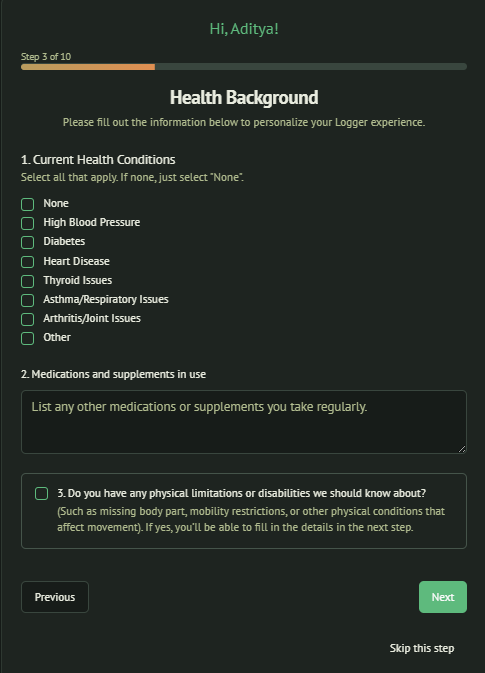
Health‑AI Fitness App — Cross‑Platform with React Native, GenKit & Firebase
An intelligent fitness companion that generates adaptive workout plans, personalized health insights, and conversational data intake—Cross-platform using React Native, an AI engine powered by GenKit, and Firebase backend services.
🧠 Project Overview
An end‑to‑end, AI-powered fitness app designed to:
- Dynamically build user profiles through intelligent, chat-style + traditional check-mark based questionnaires.
- Generate adaptive, goal-driven workout plans that evolve with user progress.
- Provide personalized health insights and notifications based on user data and habits.
- Offer a conversational interface for seamless data intake.
- Integrate securely with Firebase for authentication, storage, analytics, and AI logic.
- Plot personalized workout and meal schedules on a daily calendar view for better planning.
- Include reminders and push notifications to improve adherence to plans.
- Implement a sophisticated algorithm considering health standards like the PAR-Q+ questionnaire and established fitness guidelines.
- Aim for future migration to native development for maximum performance and deep integration with device sensors and OS-level features.
🔧 Tech Stack
| Layer | Technology |
|---|---|
| Front-end | React Native (iOS & Android) |
| AI Engine | GenKit (AI orchestration, structured JSON) |
| Backend | Firebase Auth, Firestore, Analytics |
| UI Components | GiftedChat, FlatList, Calendar libraries |
📌 Core Features & Code Snippets
1. Adaptive Questionnaire UI
Collects user data such as weight, goals, and detailed health screening questions based on PAR-Q+ standards:
const questions = [
  { id: 'weight', prompt: "What's your current weight?" },
  { id: 'goal', prompt: "What's your main fitness goal?" },
  { id: 'parq', prompt: "Do you have any known health issues that affect exercise?" },
];

const handleAnswer = async (id, answer) => {
  console.log('Answer:', id, answer);
  await firestore.collection('profiles').doc(user.uid)
    .set({ [id]: answer }, { merge: true });
  proceedToNextQuestion();
};
2. AI‑Driven Complex Workout & Nutrition Algorithm
Constructs personalized plans considering user goals, health constraints, and standards:
async function generatePlan(profile) {
  const prompt = `
Design a workout and meal plan:
- Age: ${profile.age}
- Weight: ${profile.weight}
- Goal: ${profile.goal}
- Health issues: ${profile.parq}

Include a full day's schedule mapped to time slots, with calories, macros, and exercise details. Ensure all exercises are safe given any health limitations and follow ACSM and PAR-Q+ standards.`;

  const response = await genkit.call({ model: 'AI-Model_from_a _popular_provider', prompt });
  try {
    return JSON.parse(response.text);
  } catch (e) {
    console.error('JSON parse error:', e);
    return null;
  }
}
3. Calendar Integration for Daily Planning
Maps the generated plan onto a calendar UI, making adherence easy:
<Calendar
  markedDates={
    plan.days.reduce((acc, day) => {
      acc[day.date] = { marked: true };
      return acc;
    }, {})
  }
  onDayPress={day => showPlanForDay(day.date)}
/>
4. Notifications for Adherence
Schedules reminders to improve consistency:
import PushNotification from 'react-native-push-notification';

PushNotification.localNotificationSchedule({
  message: "Time for your workout!",
  date: new Date(Date.now() + 60 * 1000) // triggers in 1 minute
});
5. Conversational Data Intake
Uses chat UI for logs:
import { GiftedChat } from 'react-native-gifted-chat';

const onSend = async newMessages => {
  setMessages(prev => GiftedChat.append(prev, newMessages));
  const text = newMessages[0].text;
  await firestore.collection('logs').add({
    userID: user.uid,
    text,
    timestamp: firebase.firestore.FieldValue.serverTimestamp()
  });
};
6. Firebase Authentication & Data Storage
Authenticates and manages user data:
import auth from '@react-native-firebase/auth';

const signIn = async (email, pass) => {
  try {
    await auth().signInWithEmailAndPassword(email, pass);
  } catch (err) {
    console.error('Auth error:', err);
  }
};
🛠️ Complex Algorithm Insights
- Factors in user biometrics, goals, and PAR-Q+ health constraints.
- Matches workouts and meals to ACSM guidelines for safety and efficacy.
- Dynamically adjusts caloric intake and workout intensity over time.
- Maps activities into time slots to produce a full-day schedule.
- Handles JSON parsing errors robustly.
🎨 UI/UX Highlights
- Clean questionnaire with progress indicators.
- Calendar view showing planned activities.
- Conversational UI for logs and progress updates.
- Visual tracking for calories, macros, and exercise history.
- Smooth navigation between daily schedules and progress charts.
🚀 Future Enhancements
-
Transition from React Native to fully native Swift (iOS) and Kotlin (Android) apps for:
- Deeper hardware integration (sensors, health APIs)
- Improved performance for animations and large data sets
- Custom native components for advanced UI/UX
-
Offline support with local caching.
-
AI-driven predictions for plateaus and injury prevention.
-
Integration with wearables for real-time biofeedback.
✅ Summary
This project aspires to build a truly intelligent personal trainer that:
- Generates safe, adaptive plans based on recognized health standards.
- Fits workouts and meals into each user's unique daily schedule.
- Engages users through conversational logging and reminders.
- Evolves toward native development for performance and precision.
All while maintaining clean architecture, strong security, and user-centric design.
Tech Stack:

Project TL;DR — Python LinkedIn Cover Letter Generator
A Python CLI tool to scrape LinkedIn job postings and generate fully personalized HTML cover letters — all without relying on LLMs (but future-ready to add them).
1. Python CLI Tool
Run a single command:
python main.py "https://www.linkedin.com/jobs/view/<JOB_ID>"
…and instantly generate a tailored HTML cover letter.
2. Web Scraping LinkedIn
Uses Selenium (headless Chrome) and BeautifulSoup4 to navigate LinkedIn job pages like:
https://www.linkedin.com/jobs/view/<JOB_ID>
and extract:
- Job title
- Company name
- Location
- Full job description
Example code snippet:
driver.get(job_url)
title = driver.find_element(By.CSS_SELECTOR, "h1.top-card-layout__title").text
company = driver.find_element(By.CSS_SELECTOR, "a.topcard__org-name-link").text
location = driver.find_element(By.CSS_SELECTOR, "span.topcard__flavor--bullet").text
desc = driver.find_element(By.CSS_SELECTOR, "div.description__text").text
Includes error handling to detect:
- Wrong URLs (e.g. search results instead of a single job view)
- Missing elements if LinkedIn’s page layout changes
3. NLP Keyword Extraction
Leverages spaCy to parse job descriptions, extract noun phrases (skills and responsibilities), and intelligently select the top 2–3 keywords to personalize your letter.
Example snippet:
import spacy
nlp = spacy.load("en_core_web_sm")

def extract_keywords(text, max_k=6):
    doc = nlp(text)
    chunks = [chunk.text.strip() for chunk in doc.noun_chunks]
    seen, keywords = set(), []
    for c in chunks:
        c_lower = c.lower()
        if c_lower not in seen:
            seen.add(c_lower)
            keywords.append(c)
        if len(keywords) >= max_k:
            break
    return keywords
4. Smart HTML Templating
Fills a clean, responsive template.html with a single [LETTER_BODY] placeholder. Automatically generates five paragraphs that integrate the extracted keywords into a natural, professional narrative.
Example HTML snippet:
<div class="letter-body">
  [LETTER_BODY]
</div>
And smart text filling:
paras.append(
    f"<p>I am excited to apply for the <strong>{job}</strong> position at "
    f"<strong>{company}</strong>. With my background in {top_keys[0]} and a "
    f"passion for innovative solutions, I’m confident I can help drive your team’s success.</p>"
)
5. Robustness & Debugging
- Validates input URLs
- Rejects non-job pages (e.g. search result pages)
- Handles missing page elements with graceful error messages
- Prints debug output to verify scraped data and template replacements
6. Minimal Dependencies
A lightweight project built entirely with:
- Python 3.x
- Selenium
- BeautifulSoup4
- spaCy
No bulky frameworks required. Easy to install in a virtual environment:
pip install requests beautifulsoup4 selenium spacy webdriver-manager
python -m spacy download en_core_web_sm
7. Instant HTML Output
Creates cover_letter.html that:
- Opens in any browser
- Can be printed as a PDF
- Preserves fonts, styling, and layout for a polished professional look
8. Saves Time
Automates the time-consuming process of writing unique cover letters for every job application — transforming hours of work into a single command-line execution.
9. LLM Future Roadmap
Currently avoids LLMs for transparency, simplicity, and full offline capability. However, a future version will optionally integrate LLM APIs (like OpenAI GPT-4) to generate even richer, dynamically written cover letters for enhanced personalization.
Example Workflow
Run your CLI tool:
python main.py "https://www.linkedin.com/jobs/view/4244763442"
Output:
✅ Smart letter saved to cover_letter.html
🎉 Done! Open cover_letter.html to review.
Open your browser and admire your custom cover letter — beautifully styled and tailored to the job.
Note: Always pass a full LinkedIn job-view URL (not search results) to ensure proper scraping:
✅ Correct:
https://www.linkedin.com/jobs/view/<JOB_ID>❌ Incorrect:
https://www.linkedin.com/jobs/search/...
This project was built to reduce reliance on LLMs and keep the logic fully transparent and explainable—while saving serious time on personalized job applications.